See what paid search produced. Know what deserves review next.
Vicin brings Google Ads performance, actual search queries, current exclusions, and a structured 90-day account audit into four connected views. Inspect the evidence before you change campaigns, budgets, keywords, or targeting.
Product views use fictional demo data. Vicin reads your connected Google Ads account and does not change it.
Overview product view with fictional demo data.
ONE PAID SEARCH WORKFLOW
Four views, one account review
Each view answers a different question. Together they connect account results, the queries behind them, the exclusions already in place, and a written account audit.
01
Overview
Read account totals and period changes for spend, clicks, impressions, conversions, click-through rate, average cost per click, cost per conversion, and conversion value.
Then inspect demand capture, budget pace, campaigns, ad groups, ads, keywords, and cities.
02
Search Terms
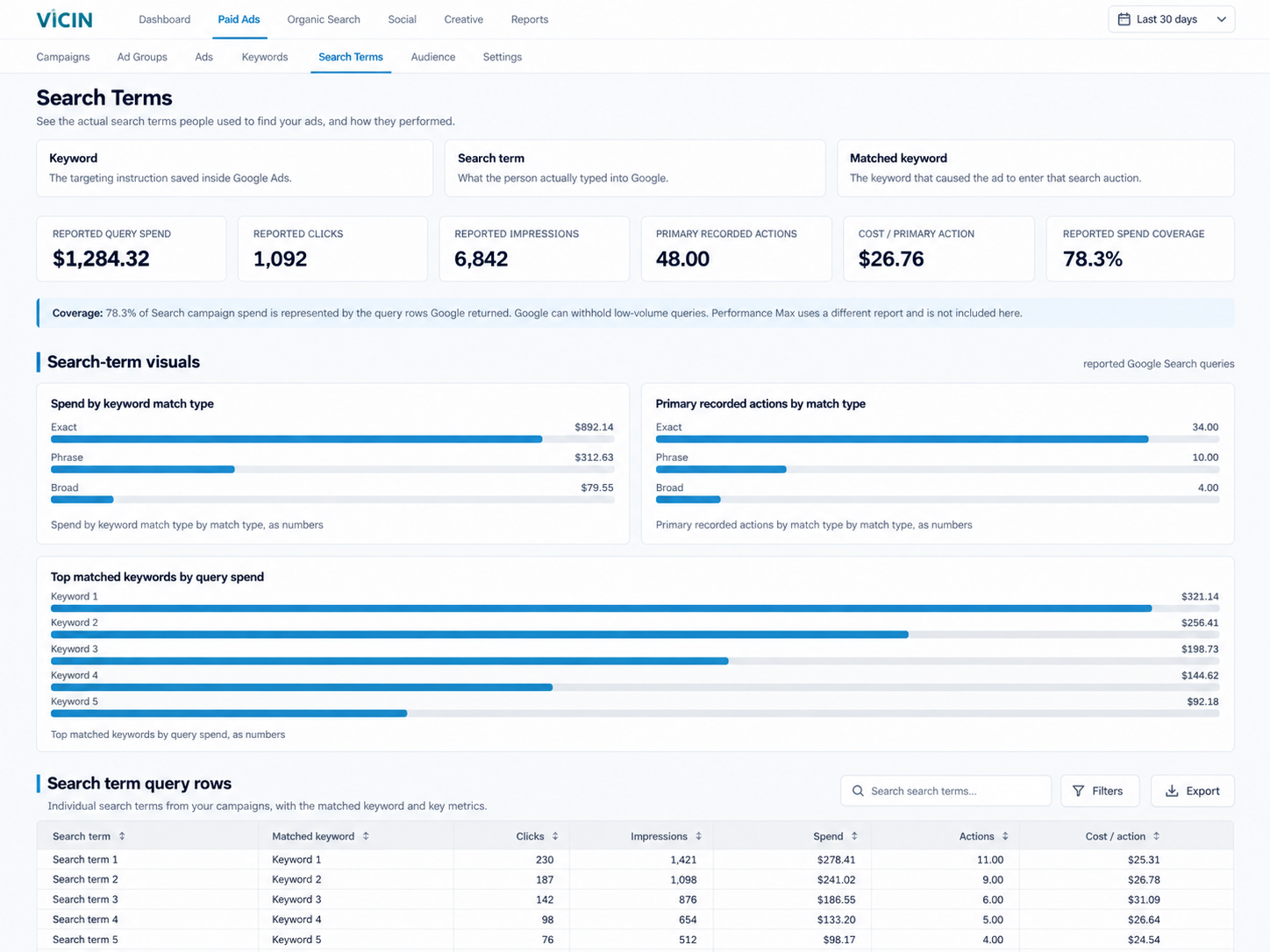
Compare the words people typed with the keyword that entered the search auction. Spend coverage shows how much Search campaign cost the returned query rows represent.
Google can withhold low-volume queries. Performance Max uses a different report.
03
Negative Keywords
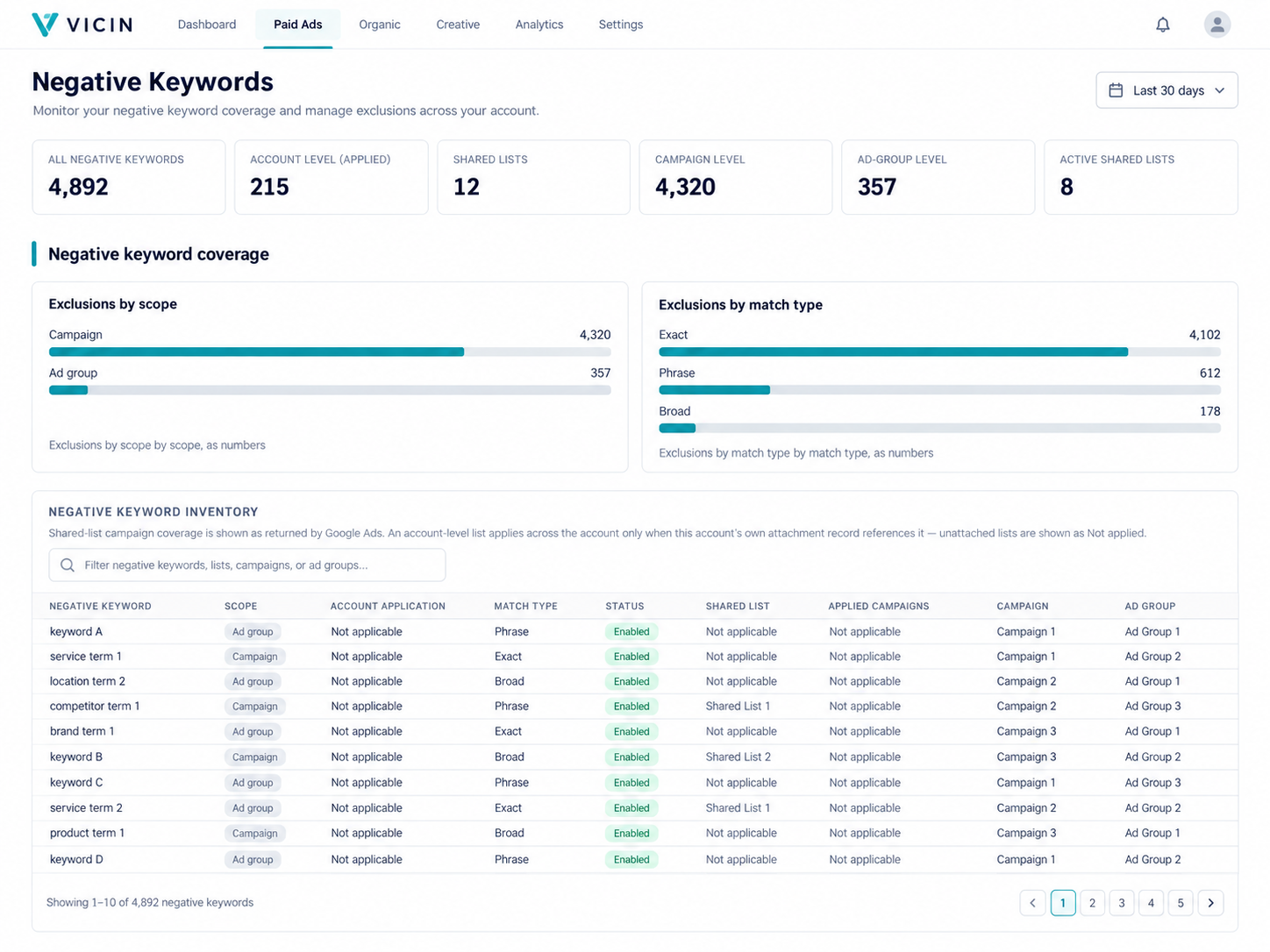
Inspect account, shared-list, campaign, and ad-group exclusions by match type, status, and application.
The view reports the current inventory. It does not decide whether an exclusion is correct.
04
Audit
Review the last 90 days of account evidence in a written business decision summary, priority findings, action plan, and technical appendix.
A completed audit can run once every 30 days for each business.
ACCOUNT PERFORMANCE
Start with the account, then follow the cost.
The Overview puts the result and its operating context on the same screen. You can see what changed before you inspect the campaign, keyword, ad, or place behind it.
The diagnosis calls out material limits in plain language, including conversion-tracking gaps and eligible search demand lost to budget or ad rank.
Demand capture separates impression share from the portions lost to budget and rank. Budget pace compares recorded spend with the monthly planning amount saved in Vicin.
Period changes remain tied to the selected reporting window. A failed comparison does not become a zero or a favorable percentage.
FOLLOW THE ACCOUNT
Find the level where performance changed.
An account total can hide the unit that created the result. Vicin lets you move from the campaign total into the structure and delivery records underneath it.
Each layer keeps its own fields. A campaign budget, an ad group delivery pattern, responsive-search-ad text, a keyword Quality Score, and city activity answer different questions.
Inspect delivery and performance inside each campaign rather than judging the campaign total alone.
03
Ads and creative
Review ad-level delivery and responsive search ad headlines, descriptions, and pinning records.
04
Keywords
Compare spend and recorded actions with Quality Score and its expected click-through, relevance, and landing-page components.
05
Cities
See where paid clicks and conversions were measured. This is activity reporting, not an audience-targeting instruction.
ACTUAL QUERY EVIDENCE
A keyword and a search term are not the same evidence.
Keywords record advertiser targeting. Search terms record what people typed. The matched keyword connects the two at the search auction.
Vicin reports impressions, clicks, spend, primary and all recorded actions, action rate, and cost per primary recorded action for each returned query row.
Keyword
The targeting instruction saved inside Google Ads.
Search term
What the person actually typed into Google.
Matched keyword
The keyword that caused the ad to enter that search auction.
Search Terms product view with fictional demo data. Vicin reports the query evidence Google Ads returns.
Spend: Which returned queries consumed the most account cost?
Match: Which keyword and match type connected each query to the ad?
Outcome: Which queries recorded primary actions, and at what cost?
Coverage: What share of Search campaign spend do the returned rows represent?
Google can withhold low-volume queries. Performance Max uses a different report and is not included in this Search Terms view. Vicin states the measured coverage instead of treating the returned rows as the complete query record.
Negative Keywords product view with fictional demo data. Vicin reads the inventory and does not add or remove exclusions.
CURRENT EXCLUSION INVENTORY
Read the exclusions already protecting the account.
Negative keywords can apply at different account levels. Vicin keeps the scope, match type, status, list, campaign, and ad group attached to each exclusion.
Counts summarize the current inventory by scope and match type. The table lets you trace each exclusion back to the place Google Ads reports it.
Account
See account-level exclusions and whether the account attachment record shows they apply.
Shared lists
See shared-list exclusions and the campaigns Google Ads reports for each list.
Campaign
See exclusions attached directly to a campaign.
Ad group
See exclusions attached to a named ad group inside a campaign.
This view is the current exclusion inventory. It does not judge whether a negative keyword is correct, and it does not add or remove anything in Google Ads.
PAID ADS AUDIT
Turn 90 days of account evidence into a reviewable decision brief.
The Audit reads a fixed window covering the last 90 days. A longer account history can support stronger conclusions, but the report never fills missing evidence with invented certainty.
Vicin combines the current campaign record, query coverage, exclusions, conversion configuration, budget evidence, landing pages, and other supported Google Ads records before the AI writes.
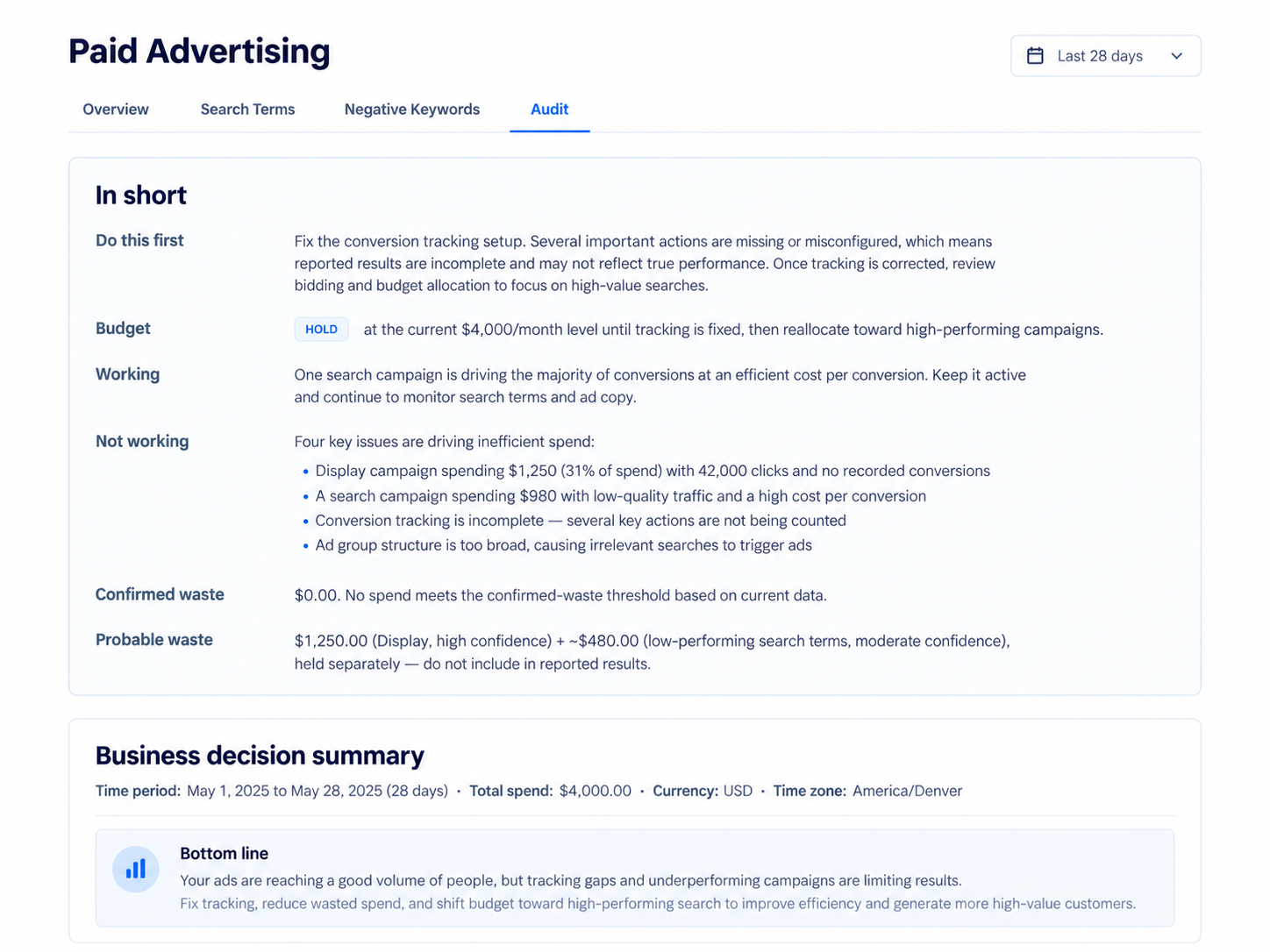
Illustrative audit summary with fictional demo data. The live audit uses a fixed 90-day window.
01
Business decision summary
Answers what works, what does not, what converts, what can change, the budget position, and the next priority.
02
Performance by control unit
Organizes Search findings by intent when query evidence supports that view, or uses the relevant unit for other campaign types.
03
Priority findings
Lists up to five material root causes with evidence, confidence, decision, and action. It does not force a minimum.
04
Action plan
Groups supported actions under change, verify, test, protect, reduce, pause, or hold. Empty categories stay out.
05
Technical appendix
Records coverage, metric trust, reconciliation, blocked conclusions, compliance notes, and the next data needed for a stronger decision.
Completed audits can run once every 30 days for each business. The report remains available to read and download as a PDF.
HOW THE AUDIT STAYS GROUNDED
Coverage comes before conclusions.
The audit first determines what the account evidence can support. Missing, partial, filtered, stale, conflicting, and unavailable records remain part of the decision.
01
Inventory the evidence
Dates, currency, account scope, campaign types, totals, configuration, query rows, and current records are classified before findings are written.
02
Check metric trust
Recorded actions, lead evidence, revenue, and cost calculations carry different proof requirements. One label cannot substitute for another.
03
Reconcile the scope
A cost ratio requires its numerator and denominator to share the same dates, entity scope, attribution scope, and currency when money values are involved.
04
Make the action testable
Each material recommendation identifies its evidence, expected effect, validation method, and a review or rollback condition when the risk calls for one.
Vicin code classifies allowed, blocked, and not-applicable conclusions before the model writes. The model cannot turn a blocked conclusion into a recommendation.
CONVERSION TRUTH
A Google Ads conversion is a recorded action, not automatically a lead.
The meaning depends on the conversion action, source, goal status, counting rule, firing behavior, attribution, and reporting scope configured in Google Ads.
Vicin keeps that distinction visible because a phone click is not an answered call, a form event is not automatically a unique lead, and a recorded action is not proof of a customer or sale.
Recorded action
The account counted an event under its Google Ads conversion settings.
Unique lead
Requires a verified lead completion and duplicate control, or a reconciled lead system.
Revenue and ROAS
Require aligned attributed value, spend, dates, currency, and attribution scope. The audit blocks the claim when those records are not trusted.
Conversion lag
Recent actions can arrive or change after the click. Outcome-led budget conclusions require a settled reporting window.
READ-ONLY ACCOUNT ACCESS
Your account stays under your control.
Vicin reads reporting and configuration records from the Google Ads account you connect. It does not create, update, or delete campaign data.
READ
See the account record
Review performance, structure, queries, exclusions, and the evidence available to the audit.
INTERPRET
Understand the decision basis
Separate measured results from AI-assisted interpretation, missing evidence, and blocked conclusions.
DECIDE
Choose what changes in Google Ads
Review each recommendation and make account changes in Google Ads when the evidence and business context support them.
The customer or specialist makes the final decision.
WHO USES THE REVIEW
Who Paid Ads supports
The same account evidence supports different work. Each audience can use the four views without surrendering the decision to an automated rule.
Move from account totals into query and configuration detail, then prepare a client-ready audit.
RELATED INTELLIGENCE
Continue the investigation
Paid search answers part of the marketing question. These Vicin views connect it to wider performance, change over time, measured cost, and source status.
These answers cover the connection, four views, audit window, AI role, account control, and measurement limits.
What do I need to connect?
Connect a Google account that can access the selected Google Ads customer account. Vicin reads the linked account through the access you authorize.
Does Vicin change my Google Ads account?
No. Vicin reads reporting and configuration records. It does not create, update, or delete campaigns, budgets, ads, keywords, targeting, or exclusions.
What are the four Paid Ads views?
Overview covers account and campaign performance. Search Terms covers returned queries and matched keywords. Negative Keywords covers the current exclusion inventory. Audit produces the 90-day written review.
What does the Overview show?
It shows account KPIs, period changes, conversion context, demand capture, budget pace, campaign trends, and detail for campaigns, ad groups, ads, keywords, and cities.
What is the difference between a keyword and a search term?
A keyword is the targeting instruction saved in Google Ads. A search term is what a person typed. The matched keyword is the keyword that entered the ad into that auction.
Why can Search Terms coverage be below 100 percent?
Google can withhold low-volume queries. Vicin compares the cost in returned query rows with Search campaign cost and reports the represented share when the denominator is available.
Does Search Terms include Performance Max queries?
No. Performance Max uses a different report and is not included in this Search Terms view.
Does Negative Keywords edit my exclusions?
No. The view reports account, shared-list, campaign, and ad-group exclusions. It does not add or remove anything in Google Ads.
What time range does the audit use?
The audit uses the last 90 days. The Overview and the other reporting views follow their selected reporting window.
How often can I run an audit?
Each business can complete one audit every 30 days. The last report remains available between runs.
How does AI take part in the audit?
Vicin code prepares and classifies the evidence first. AI then analyzes and writes within those gates. AI-generated analysis may contain errors, so review every recommendation before changing the account or business.
Does a Google Ads conversion mean I received a lead or customer?
No. It means Google Ads recorded an action configured in the account. A lead, customer, sale, revenue, or ROAS claim needs stronger aligned evidence.
Can I download the audit?
Yes. The completed report remains available in Vicin and can be downloaded as a PDF.
Review paid search with the evidence in view.
Connect Google Ads, inspect the four Paid Ads views, and run the 90-day account audit when you are ready.
Vicin uses optional Google Analytics cookies to measure public website activity. Choose I agree to allow analytics, or Necessary only to keep Analytics off.